
Activating Windows properly is important if you want a stable, secure, and reliable PC experience. Many users in Bangladesh install Windows 11 Pro on a laptop or desktop but later face activation warnings, invalid key errors, or confusion about where to enter the product key.
This guide explains how to activate Windows 11 Pro in Bangladesh safely using a valid product key or digital license. It also covers common activation problems, what to check before buying a Windows 11 Pro activation key BD, and how to avoid risky activation methods.
Microsoft states that Windows 10 or Windows 11 activation requires either a 25-character product key or a digital license, depending on how the Windows copy was obtained. You can also read Microsoft’s official explanation about finding a Windows product key on the Microsoft Support website.
What Is Windows 11 Pro Activation?
Windows activation confirms that your copy of Windows is genuine and properly licensed for your device. Without activation, Windows may still run, but you can face limitations such as activation reminders, personalization restrictions, and possible problems with future setup or support.
For Windows 11 Pro, activation usually happens in one of two ways:
| Activation Type | How It Works | Best For |
|---|---|---|
| Product Key | You enter a 25-character Windows product key manually | New activation or fresh installation |
| Digital License | Windows activates automatically when linked to your device/account | Reinstalling Windows on the same device |
A Windows 11 Pro product key Bangladesh buyer should understand this before purchasing. Not every key type works in every situation, and not every activation issue is caused by the key itself. Sometimes the issue comes from edition mismatch, internet problems, previous installation errors, or device hardware changes.
Before You Activate Windows 11 Pro: Check These First
Before entering your Windows 11 Pro license key, check the following points. This can prevent unnecessary activation errors.
1. Make Sure Your PC Supports Windows 11
Windows 11 has minimum system requirements. Microsoft lists requirements such as a 1 GHz or faster processor with 2 or more cores, 4 GB RAM, 64 GB storage, UEFI Secure Boot capability, TPM 2.0, DirectX 12 compatible graphics, and an HD display larger than 9 inches. You can check Microsoft’s official Windows 11 specifications on the Microsoft website.
If your PC does not meet Windows 11 requirements, activation is not the main problem. The installation itself may be unstable, unsupported, or difficult to update properly.
2. Confirm You Installed Windows 11 Pro, Not Home
This is a common mistake. A Windows 11 Pro key is designed for Windows 11 Pro. If your PC has Windows 11 Home installed, a Pro key may not activate the system in the way you expect.
To check your edition:
- Click Start
- Go to Settings
- Select System
- Click About
- Check Windows specifications
- Look at the Edition
If it says Windows 11 Home, you may need to upgrade the edition to Pro before using a Windows 11 Pro key.
3. Keep Your Internet Connection Stable
Windows activation requires online verification in most cases. If your internet connection is unstable, activation may fail temporarily even when the product key is valid.
4. Avoid Cracked or Bypass Activation Tools
Do not use cracks, patchers, fake activators, or bypass tools. These methods can create security risks, malware exposure, system instability, and future activation problems.
For a business, freelancer, student, or office user in Bangladesh, unsafe activation is not worth the risk. Use genuine Windows activation only.
How to Activate Windows 11 Pro with Product Key
Follow these steps to activate Windows 11 Pro safely.
Step 1: Open Windows Settings
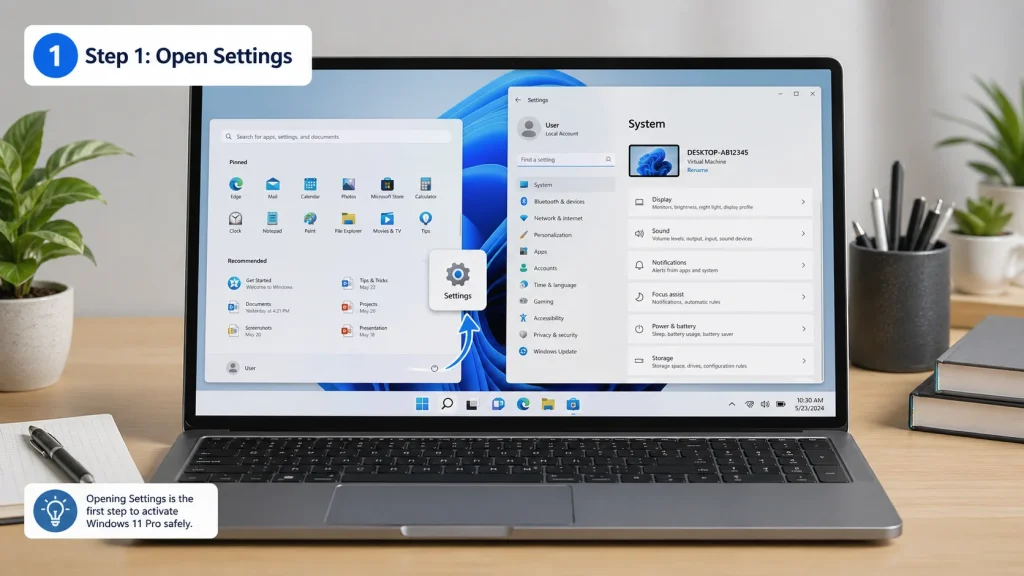 Step 1: Open Windows Settings before starting Windows 11 Pro activation.
Click the Start button and open Settings.
Step 2: Go to Activation Settings
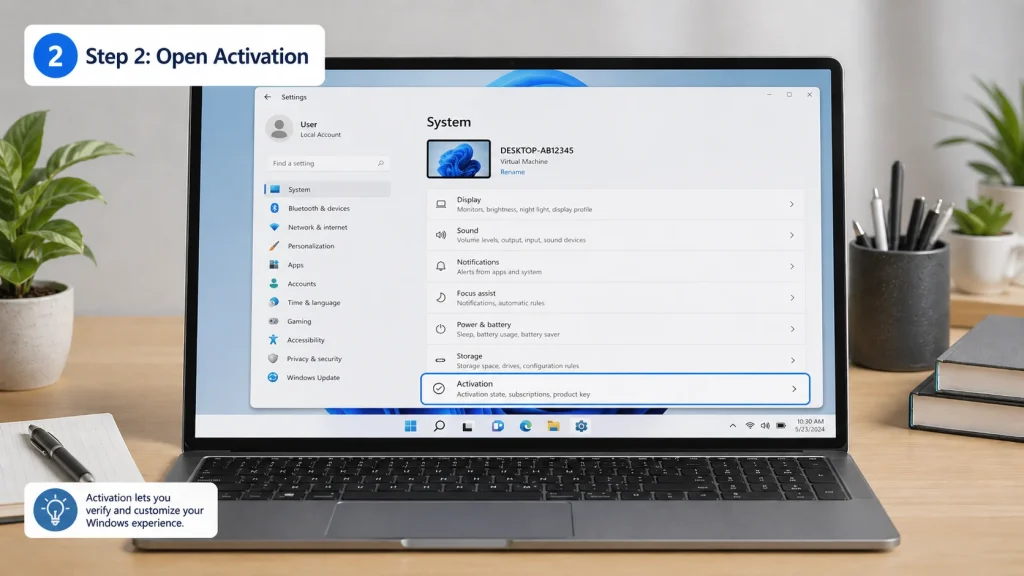
Go to:
Settings → System → Activation
Microsoft’s official activation guide also directs users to this path for entering or changing a product key after installation. You can read the official Windows activation guide on Microsoft Support.
Step 3: Click Change Product Key
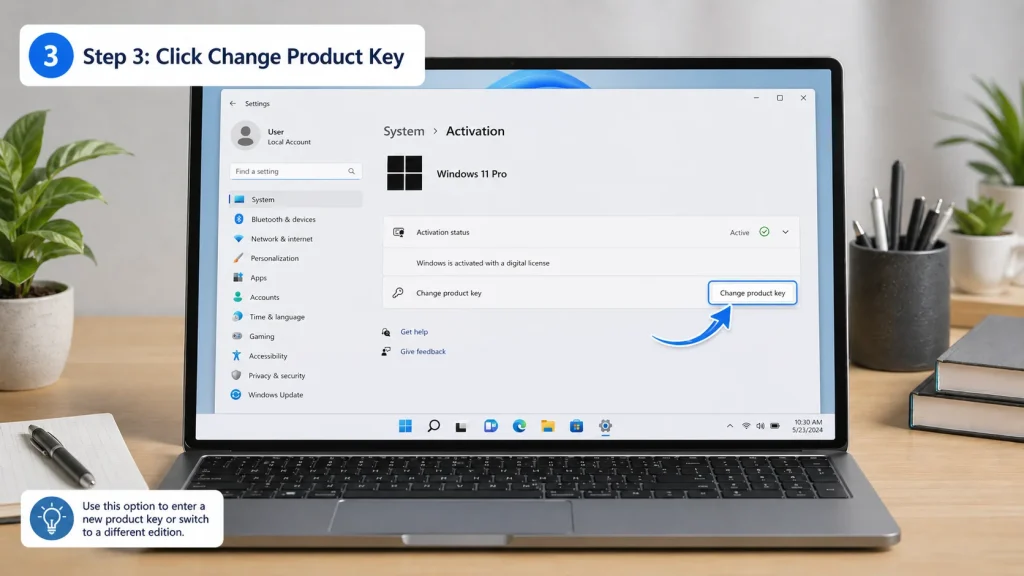 Step 3: Click Change product key to enter your Windows 11 Pro key.
Under the activation section, find Change product key.
Click it and wait for the product key window to appear.
Step 4: Enter Your 25-Character Product Key
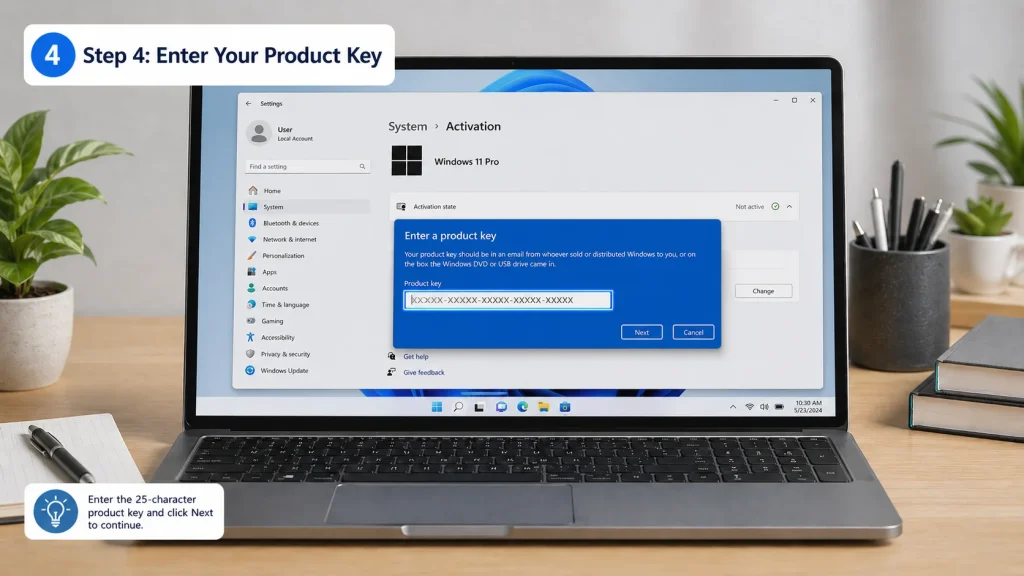 Step 4: Enter the 25-character Windows 11 Pro product key carefully.
Enter the Windows 11 Pro product key carefully. A Windows product key is usually a 25-character code. Microsoft confirms that Windows may require either a 25-character product key or a digital license depending on how the copy was obtained.
Make sure there are no typing mistakes. Product keys usually include letters and numbers, so double-check confusing characters.
Step 5: Click Next and Activate
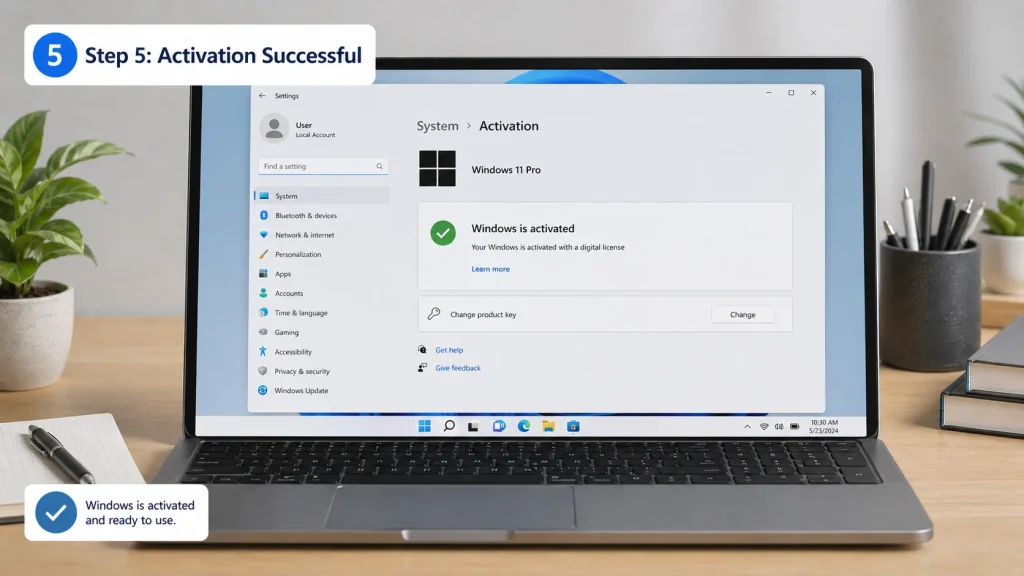 Step 5: After successful activation, Windows will show the activated status.
After entering the key, click Next and follow the on-screen instructions.
If the key is valid, the internet connection is stable, and the Windows edition matches, your Windows 11 Pro should activate successfully.
How to Check If Windows 11 Pro Is Activated
After activation, check your activation status:
- Open Settings
- Go to System
- Click Activation
- Check the activation status
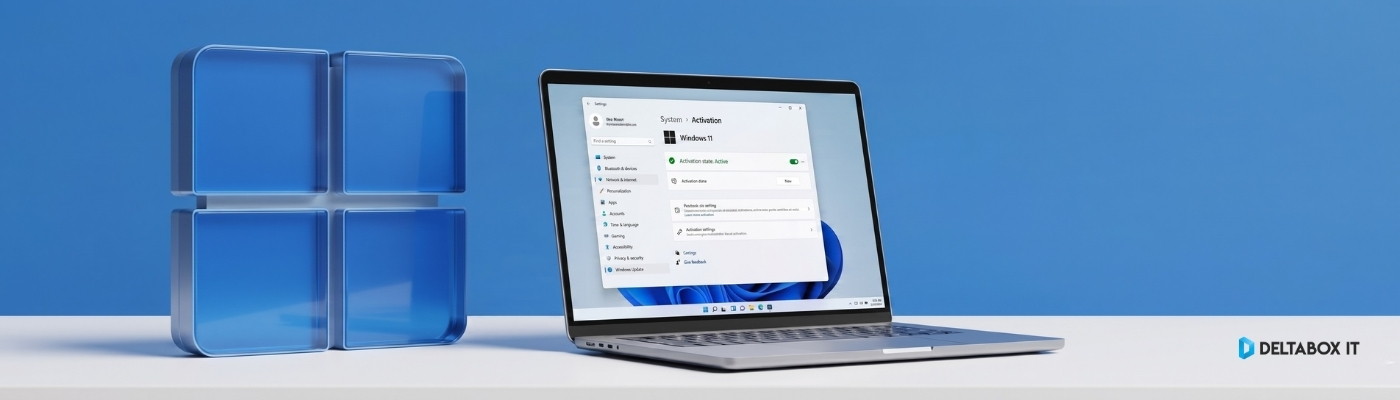
If activation is successful, Windows will show that your system is activated.
You may also see whether activation is linked to a digital license or Microsoft account, depending on your setup.
Common Windows 11 Activation Problems in Bangladesh
Many users search for Windows 11 activation problem Bangladesh because activation can fail even after entering a key. Below are the most common reasons.
1. Wrong Windows Edition
A Windows 11 Pro key should be used with Windows 11 Pro. If your device is running Windows 11 Home, Enterprise, Education, or another edition, activation may fail.
Fix: Check your Windows edition first. Install or switch to the correct edition if needed.
2. Typing Mistake in Product Key
A single wrong character can stop activation.
Fix: Copy and paste the key carefully if possible. If typing manually, check every group of characters.
3. Internet Connection Issue
Activation may fail if your PC cannot connect to Microsoft’s activation servers.
Fix: Restart the router, disable unstable VPN connections, and try again later.
4. Key Already Used or Not Valid for Your Device
Some product keys may be device-specific, region-sensitive, or unsuitable for your current Windows edition.
Fix: Contact the seller or support team. If you purchased from DeltaBox IT, contact support with your order details.
5. Hardware Change Issue
A major hardware change, especially replacing the motherboard, can affect activation. Microsoft notes that significant hardware changes may require reactivation, and users may need to use Activation settings or the same product key depending on the case. You can read Microsoft’s official reactivation guide on Microsoft Support.
Fix: Go to Settings → System → Activation and follow the available reactivation option. If needed, contact your seller or Microsoft support.
What Is a Digital License in Windows 11?
A digital license is a method of Windows activation that does not require manually entering a product key. Microsoft explains that a digital license is used in Windows 10 and Windows 11 and can activate Windows without entering a product key.
This is useful when reinstalling Windows on the same device. If your device already has a digital license, Windows may activate automatically after installation when connected to the internet.
However, if you are buying a new Windows 11 Pro activation key in BD, you should still confirm what type of license/access you are purchasing and how activation will be handled.
Is It Safe to Buy Windows 11 Pro Activation Key in Bangladesh?
Yes, it can be safe if you buy from a reliable source and understand what you are purchasing.
A safe buying decision should include:
- Clear product name: Windows 11 Pro License Key
- Clear activation instructions
- Support after purchase
- No cracked or bypass activation
- No unrealistic lifetime claims unless clearly stated in official policy
- Clear delivery and warranty/replacement terms
DeltaBox IT provides digital products and software access as a third-party reseller. For Windows 11 Pro License Key, customers should check the product page for the latest package details, delivery terms, and support information before ordering.
Important: DeltaBox IT is not Microsoft and does not own Windows. Windows is a Microsoft product. DeltaBox IT provides access/license key service based on available package terms.
Why Genuine Windows Activation Matters
Using genuine Windows activation is not just about removing the activation watermark. It matters because your operating system is the base of your entire PC.
A properly activated Windows 11 Pro system helps with:
- Better system reliability
- Cleaner Windows setup
- Access to normal Windows settings
- Professional use for office, freelancing, and business work
- Reduced risk from unsafe activation tools
- Fewer future activation issues
For users in Bangladesh who use a laptop or desktop for work, study, design, office files, browsing, freelancing, or business operations, genuine activation is the safer long-term choice.
Windows 11 Pro Activation Checklist
Before buying or activating, use this checklist:
| Checklist Item | Status |
|---|---|
| PC meets Windows 11 requirements | Check before activation |
| Installed edition is Windows 11 Pro | Required for Pro key |
| Internet connection is stable | Required for online verification |
| Product key is typed correctly | Avoid character mistakes |
| No crack/bypass tool used | Strongly recommended |
| Seller provides support | Important for activation issues |
| Product terms are clear | Check before purchase |
When Should You Contact Support?
Contact support if:
- Your key shows invalid
- Windows edition does not match
- Activation fails after multiple attempts
- You changed major hardware
- You are not sure whether your PC has Home or Pro installed
- You need help finding the activation settings
For DeltaBox IT orders, contact the support team with your order details. Support should be handled through the official DeltaBox IT support channel.
You can also visit DeltaBox IT to explore available digital products and software access options in Bangladesh.
FAQ: Windows 11 Pro Activation in Bangladesh
1. How do I activate Windows 11 Pro in Bangladesh?
Go to Settings → System → Activation → Change product key, enter your 25-character Windows 11 Pro product key, and follow the on-screen instructions. Microsoft also lists this as the official path for entering a product key after installation.
2. Can I activate Windows 11 Pro without a product key?
Windows activation requires either a product key or a digital license. Microsoft states that without one of these, you will not be able to activate your device.
3. Why is my Windows 11 Pro key not working?
Common reasons include wrong Windows edition, typing mistakes, unstable internet, previously used key, hardware change, or unsupported installation.
4. Can I use a Windows 11 Pro key on Windows 11 Home?
A Windows 11 Pro key is intended for Windows 11 Pro. If your device is running Windows 11 Home, check your edition and upgrade path before trying to activate.
5. Is cracked Windows activation safe?
No. Cracked activation tools can create security and stability risks. Use genuine activation methods only.
6. Does Windows 11 need TPM 2.0?
Yes, TPM 2.0 is part of Microsoft’s listed Windows 11 system requirements. Microsoft’s Windows 11 specifications also include Secure Boot capability, 4 GB RAM, and 64 GB storage among the minimum requirements.
7. Where can I buy Windows 11 Pro License Key in Bangladesh?
You can buy a Windows 11 Pro License Key from a trusted digital product provider in Bangladesh. Before ordering, check the product terms, delivery time, support availability, and activation guidance.
Final Recommendation
If you already installed Windows 11 Pro and need activation, the safest method is simple: use a valid Windows 11 Pro product key or digital license through the official Windows Activation settings.
Avoid cracked tools, bypass methods, and unclear sellers. For users in Bangladesh, a reliable Windows 11 Pro activation key BD with clear support is better than taking risks with unsafe activation methods.
For the latest Windows 11 Pro License Key package details, check DeltaBox IT’s product page and confirm the current delivery and support terms before purchase.