Best Action Research Tools in Education: Methods, Software and Research Stack

Educational action research does not require an expensive or complicated software stack.
A teacher investigating low classroom participation may only need a structured observation form, a short student survey, a spreadsheet and a reflective journal. A university researcher studying an intervention across several schools may require offline data collection, interview transcription, qualitative coding, statistical analysis and collaborative reference management.
The right tools depend on the research question, data type, participant group and scale of the project.
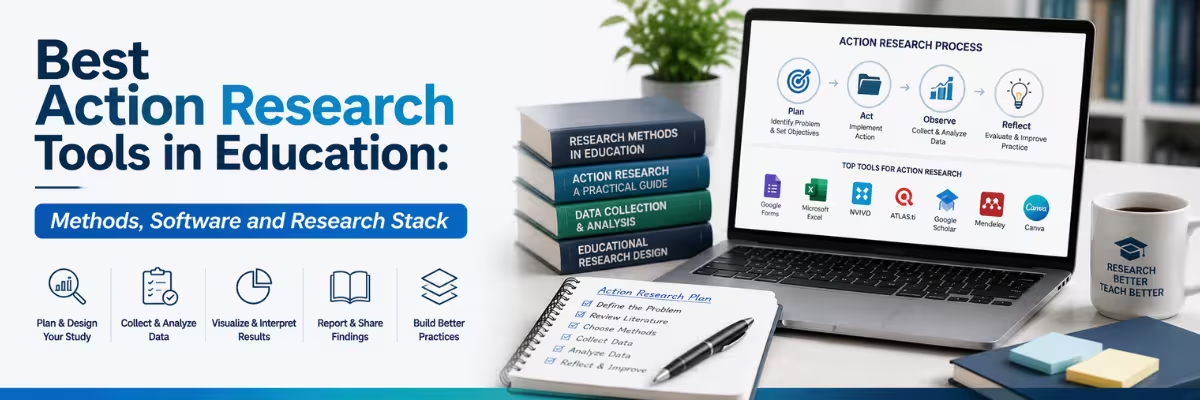
Effective action research tools in education should help researchers move through a recurring process: identify a practical problem, plan an intervention, collect evidence, analyse what changed, reflect on the findings and improve the next cycle. Action research is commonly represented as a cycle of planning, acting, observing and reflecting rather than a one-time linear study.
This guide compares survey platforms, interview and observation tools, qualitative and quantitative analysis software, collaboration systems and reporting tools. It also explains how action research relates to empirical research and recommends practical software stacks for different education-research projects.
For a broader overview of academic writing, literature review, plagiarism checking and study platforms, read the guide to essential education and research AI tools for Bangladeshi students and researchers.
Quick Answer: What Are the Best Action Research Tools in Education?
There is no universal best platform. Each tool should solve a defined part of the research process.
| Research Task | Suitable Tools |
|---|---|
| Classroom surveys and feedback | Google Forms or Microsoft Forms |
| Offline field data collection | KoboToolbox or ODK |
| Classroom observation | Structured spreadsheet, digital form or observation template |
| Online interviews and focus groups | Zoom or another approved meeting platform |
| Interview transcription | Otter or institution-approved transcription software |
| Basic qualitative coding | Word, Excel or Google Sheets |
| Advanced qualitative analysis | NVivo, ATLAS.ti or MAXQDA |
| Basic quantitative analysis | Excel, Google Sheets, jamovi or JASP |
| Advanced statistical analysis | SPSS or R |
| Reference management | Zotero |
| Collaborative writing | Google Docs or Microsoft Word |
| Reporting and presentation | Word, PowerPoint, Google Slides or Canva |
A small classroom project should start with the simplest reliable combination. Advanced research software is justified only when the volume, complexity or reporting requirements make manual management inefficient.
What Is Action Research in Education?
Action research is a practitioner-focused approach used to understand and improve a real educational problem.
A teacher might investigate whether retrieval practice improves weekly quiz performance. A department may test whether revised feedback procedures increase assignment completion. A school leader may examine whether a new attendance intervention affects student participation.
The researcher is usually close to the setting and actively involved in improving practice. The process is cyclical:
- Plan: Identify the problem and design an informed intervention.
- Act: Implement the change in a real educational setting.
- Observe: Collect evidence about implementation and outcomes.
- Reflect: Interpret the evidence and decide what to retain, revise or test next.
The next cycle begins from what the researcher learned during the previous one. This iterative structure distinguishes action research from studies that collect data once and stop after reporting the result.
Action research may use surveys, interviews, classroom observations, assessment results, reflective journals, focus groups, attendance records or student work. The method is defined by its improvement-oriented cycle—not by one particular type of data.
What Is Empirical Research?
Empirical research draws conclusions from observed or measured evidence rather than relying only on theory or opinion.
It may use quantitative methods, such as experiments, test scores and statistical comparisons. It may also use qualitative methods, including interviews, observations and thematic analysis. Mixed-methods studies combine both forms of evidence.
An empirical research article normally explains:
- The research question
- Participants or data source
- Study design
- Data-collection instruments
- Analysis method
- Results
- Interpretation and limitations
The presence of a survey or dataset alone does not make a study rigorous. Researchers must explain how the evidence was collected, why the chosen method was suitable and how the conclusions follow from the results.
Action Research vs Empirical Research
The phrase “action research tools vs empirical research tools” can be misleading because action research is often empirical.
A classroom action-research project may collect student survey responses, test results and observation data. Those are empirical forms of evidence. The real difference is usually the purpose and design of the study, not whether it uses data.
| Area | Action Research | Broader Empirical Research |
|---|---|---|
| Primary purpose | Improve a specific practice or local problem | Produce evidence about a research question |
| Researcher role | Often a practitioner within the setting | May be internal or external |
| Structure | Cyclical and iterative | May be experimental, observational, cross-sectional or longitudinal |
| Intervention | Often central to the project | May or may not be included |
| Context | Usually local and practice-based | May target broader populations |
| Data type | Qualitative, quantitative or mixed | Qualitative, quantitative or mixed |
| Generalisation | Often limited to the local setting | May aim for wider inference |
| Final outcome | Reflection and revised practice | Findings, theory testing or explanation |
The same survey, statistical package or coding software may be used in both approaches. Tool selection should therefore follow the data and research design rather than the label attached to the project.
Choosing Research Tools Before Starting the Study
Researchers often select software too early. They choose a familiar survey platform or analysis program before deciding what evidence is required.
The better sequence is:
- Define the practical problem.
- Write a focused research question.
- Decide what change or intervention will be tested.
- Identify the evidence needed to assess that change.
- Select tools that can collect and analyse that evidence.
For example, a teacher asking whether group discussion increases student confidence may need a short pre-and-post survey, observation notes and several student interviews. A project examining changes in examination performance may require assessment data and quantitative analysis instead.
Selection principle: Use the lightest tool that can collect reliable evidence, protect participant data and support transparent analysis.
Before collecting data, confirm institutional approval, informed consent requirements, data-retention rules and whether children or other protected groups are involved.
Survey Tools for Education Research
Surveys are useful when a researcher needs structured feedback from students, teachers, parents or administrators.
Google Forms
Google Forms is suitable for short classroom surveys, feedback forms, quizzes and basic questionnaires. It can collect responses through a browser and display response summaries in real time. Responses can also be connected to a spreadsheet for cleaning and analysis.
It works well for:
- Student-engagement surveys
- Pre-and-post intervention questionnaires
- Course feedback
- Teacher reflection forms
- Parent feedback
- Basic knowledge checks
Google Forms is accessible and relatively easy to deploy, but it is not a substitute for good questionnaire design. Biased wording, unclear scales and excessive questions will produce weak data regardless of the platform.
Microsoft Forms
Microsoft Forms can create surveys, polls and quizzes, display responses as they arrive and export data to Excel for further analysis. It is particularly practical for schools and universities already working within Microsoft 365.
Researchers using Word, Excel and PowerPoint for the wider project may find it easier to keep collection, analysis and reporting within the same environment. Current Microsoft Office options may be relevant where institutional access is unavailable.
KoboToolbox and ODK
Google Forms and Microsoft Forms are convenient when participants have dependable internet access. They are weaker choices for fieldwork in areas with unstable connectivity.
KoboToolbox supports browser-based forms and the KoboCollect Android application. KoboCollect is designed for mobile field data collection and can work offline before submissions are uploaded later. KoboToolbox can also collect GPS information and supports online-offline web-form workflows.
ODK similarly supports offline data collection through mobile applications or web forms and can be used with managed or self-hosted infrastructure.
These tools are more suitable for:
- Rural-school research
- Multi-site field studies
- Enumerator-led surveys
- School mapping
- Community education projects
- Projects collecting location or media data
They require more setup and testing than a simple classroom form.
Survey-Tool Comparison
| Tool | Best For | Main Strength | Main Limitation |
|---|---|---|---|
| Google Forms | Small classroom surveys | Simple setup and spreadsheet connection | Limited advanced fieldwork controls |
| Microsoft Forms | Microsoft-based institutions | Surveys, quizzes and Excel export | Best value within Microsoft workflows |
| KoboToolbox | Offline and field research | Mobile, offline and location-based collection | Requires more form-design knowledge |
| ODK | Complex or controlled data systems | Flexible offline and server options | More technical setup |
| Qualtrics | Formal institutional surveys | Advanced survey logic and research controls | Can be costly without institutional access |
Pilot the survey with a small group before full deployment. Check whether respondents understand the questions, complete the form correctly and interpret scales consistently.
Interview and Observation Tools
Action research often needs qualitative evidence explaining why an intervention worked, failed or affected different participants differently.
Interviews and Focus Groups
Interviews are useful when the researcher needs detailed experiences rather than fixed-choice responses. Focus groups can reveal shared concerns, disagreement and group-level perceptions.
Online sessions may be conducted through an approved meeting platform such as Zoom. Researchers should obtain appropriate consent before recording and explain how audio, video and transcripts will be stored.
Where access is required for online interviews or supervisor meetings, current Zoom subscription options can be reviewed separately.
Automated transcription tools such as Otter can record or import conversations and produce transcripts. However, transcription accuracy depends on audio quality, speakers and supported languages. Otter’s current official language list does not include Bengali, so Bangla interviews may require manual transcription or another suitable service.
Automated transcripts must be checked against the recording before coding. Names, technical terms and accented speech are common sources of error.
Classroom Observation
Observation is central to many classroom action-research projects because it captures behaviour during the intervention.
A useful observation form should define what the researcher will record. “Students appeared engaged” is too vague. A stronger instrument might record:
- Number of students contributing to discussion
- Time spent on the assigned task
- Frequency of teacher prompts
- Types of student questions
- Instances of peer collaboration
- Evidence of confusion or disengagement
Observation data can be recorded in a printed template, spreadsheet, mobile form or research journal. For a small project, an elaborate platform is unnecessary.
Researchers should also decide whether the observation is structured, semi-structured or open-ended. If more than one observer is involved, they should use the same definitions and compare how consistently they record events.
Qualitative Research Tools
Qualitative analysis involves more than highlighting interesting quotations. Researchers must develop a transparent coding process, group related codes, compare participants and connect themes to the research question.
Word, Excel and Google Sheets
For a small dataset—such as five interviews or several observation notes—manual coding may be sufficient.
Researchers can place excerpts in a spreadsheet with columns for:
| Participant | Data Excerpt | Initial Code | Category | Theme | Researcher Note |
|---|
This approach is inexpensive and easy to audit. It becomes difficult when the dataset contains dozens of interviews, several coders or large amounts of multimedia content.
NVivo, ATLAS.ti and MAXQDA
Dedicated qualitative research tools are more appropriate for larger or complex datasets.
ATLAS.ti supports analysis across text, PDFs, images, audio, video and geographic data. MAXQDA supports qualitative and mixed-methods projects and can import varied research materials, including text, PDFs and bibliographic information.
These platforms can help researchers:
- Create and manage a codebook
- Code interviews and observation notes
- Retrieve all passages assigned to a code
- Compare groups or cases
- Write analytical memos
- Visualise relationships
- Coordinate team coding
Software organises the material; it does not decide which interpretation is valid. Researchers must still explain how codes were created, how themes were reviewed and how alternative interpretations were considered.
Quantitative Analysis Tools
Quantitative tools range from simple spreadsheets to programmable statistical environments.
Excel and Google Sheets
Spreadsheets are suitable for:
- Data cleaning
- Frequencies and percentages
- Means and standard deviations
- Basic charts
- Pre-and-post score comparisons
- Attendance or participation tracking
They are practical for small classroom projects, especially when the purpose is local improvement rather than advanced modelling.
Researchers should preserve an untouched copy of the original data and document every cleaning decision. Manually changing values without a record makes the analysis difficult to reproduce.
jamovi and JASP
jamovi is a free, open-source statistical platform that stores data, analyses and results in a shareable project file. JASP supports common datasets and a broad selection of frequentist and Bayesian analyses through a graphical interface.
These are useful for students who need more than spreadsheet formulas but are not ready to write statistical code.
SPSS and R
SPSS provides statistical testing, regression, forecasting and other analytical functions through a graphical interface. R is a free programming language and environment for statistical computing, data manipulation and graphics, with extensive capabilities through additional packages.
SPSS may be easier for researchers who prefer menus and institution-supported workflows. R offers greater flexibility and reproducibility but requires more technical learning.
Statistical caution: The software can calculate a test correctly while the researcher chooses the wrong test, violates its assumptions or interprets the result incorrectly.
Qualitative vs Quantitative Tool Selection
| Data Situation | Recommended Starting Tool |
|---|---|
| Five short interviews | Word or spreadsheet coding |
| Thirty detailed interviews | NVivo, ATLAS.ti or MAXQDA |
| Classroom observation notes | Spreadsheet or qualitative platform |
| Simple student survey | Forms plus Excel or Sheets |
| Pre-and-post test scores | Excel, jamovi or JASP |
| Multiple predictors or advanced modelling | SPSS or R |
| Mixed interview and survey data | MAXQDA, NVivo or a combined workflow |
| Reproducible statistical research | R, jamovi or scripted analysis |
The software should follow the method. Do not collect numerical data merely because quantitative analysis looks more scientific, and do not choose interviews if the research question requires measurable outcome comparison.
Collaboration, References and Reporting
Action research frequently involves teachers, supervisors, research assistants or school leaders. A clear collaboration system prevents duplicated files, lost notes and inconsistent analysis.
Google Docs and Drive are useful for shared protocols, observation templates and collaborative reports. Microsoft Word, Excel and OneDrive may be more appropriate where the institution already uses Microsoft 365. Users needing additional cloud capacity can review current Google One storage options.
Zotero can store references and create shared group libraries. Private groups allow teams to collaborate on a common collection without publishing the library publicly.
A practical project folder might include:
- Research protocol
- Consent and ethics documents
- Blank instruments
- Raw data with restricted access
- Cleaned or anonymised data
- Analysis files
- Reflective journals
- Draft report
- Final presentation
- Decision log for the next action cycle
Raw identifiable data should not be stored in the same broadly shared folder as presentation slides or public reports.
Recommended Action Research Tool Stack by Research Stage
| Research Stage | Recommended Tools | Purpose |
|---|---|---|
| Define the problem | Word, Google Docs or reflective journal | Record the problem and initial evidence |
| Review related research | Google Scholar, library databases and Zotero | Find and organise previous studies |
| Design the intervention | Docs, Word or project board | Document activities, timeline and responsibilities |
| Create instruments | Google Forms, Microsoft Forms or KoboToolbox | Build surveys, quizzes and observation forms |
| Collect qualitative data | Interview recorder, observation template or KoboToolbox | Capture experiences and classroom behaviour |
| Collect quantitative data | Forms, tests or institutional records | Measure attendance, performance or participation |
| Analyse qualitative data | Spreadsheet, NVivo, ATLAS.ti or MAXQDA | Code and develop themes |
| Analyse quantitative data | Excel, jamovi, JASP, SPSS or R | Summarise and test numerical results |
| Collaborate | Drive, OneDrive and Zotero | Manage documents and references |
| Report and reflect | Word, PowerPoint, Google Slides or Canva | Communicate findings and plan the next cycle |
Recommended Software Stacks by Project Size
Simple Classroom Action Research
A teacher examining one class may use:
- Google or Microsoft Forms
- A structured observation sheet
- Excel or Google Sheets
- Word or Google Docs
- Zotero for references
This is sufficient for many small projects. Adding advanced qualitative software would create unnecessary complexity.
Mixed-Methods Thesis Project
A postgraduate student may need:
- KoboToolbox or Forms for surveys
- Zoom or an approved recorder for interviews
- Otter or manual transcription
- NVivo, ATLAS.ti or MAXQDA
- jamovi, JASP or SPSS
- Zotero
- Word or Google Docs
The researcher should decide how qualitative and quantitative evidence will be integrated before analysis begins.
Multi-School or Field Research
A larger project may require:
- KoboToolbox or ODK
- Enumerator training and pilot testing
- A controlled data dictionary
- Qualitative analysis software
- SPSS or R
- Shared reference and document systems
- Formal backups and access permissions
At this scale, data governance and quality control matter more than the number of software features.
Common Tool-Selection Mistakes
Starting With Software Instead of the Research Question
A researcher chooses SPSS, NVivo or an AI tool first and then tries to reshape the study around it. This reverses the correct process.
Collecting More Data Than Can Be Analysed
Long surveys and unnecessary interviews increase participant burden and create unfinished datasets. Every question should support a research objective.
Using Automated Transcripts Without Checking Them
Transcription errors can alter participant meaning. Review the audio and anonymise personal details before analysis.
Treating Themes as Automatically Generated Findings
Qualitative software can suggest patterns or retrieve coded passages. The researcher remains responsible for interpretation and reflexivity.
Reporting Significance Without Practical Meaning
A statistically significant result may be too small to matter in classroom practice. Report effect, context and limitations—not only a p-value.
Ignoring the Reflective Cycle
Action research is not complete when the first report is written. The findings should inform a revised intervention, another observation cycle or a justified decision to stop.
Action Research Ethics and Data-Safety Checklist
Before collecting education data:
- Confirm institutional or supervisor approval.
- Explain the research purpose to participants.
- Obtain appropriate consent or assent.
- Collect only necessary personal information.
- Restrict access to identifiable data.
- Separate participant identities from analysis files.
- Explain whether sessions will be recorded.
- Verify automated transcripts manually.
- Report findings without exposing individuals.
- Follow the institution’s retention and deletion rules.
Research involving children, examination records, health information or vulnerable groups may require additional safeguards.
Choosing Educational Research Tools in Bangladesh
Bangladeshi researchers should consider internet reliability, device availability, language support, institutional software access and participant digital literacy.
Google Forms or Microsoft Forms may be suitable for university students with reliable connectivity. KoboToolbox or ODK may be stronger for rural schools, community education projects and offline fieldwork. Bangla interviews may also require human transcription because some international transcription platforms do not currently support Bengali.
Before paying for research software, check whether the university already provides access. Also confirm:
- Supported operating systems
- Offline capability
- Data-export formats
- Team-collaboration requirements
- Student or institutional licensing
- Storage and privacy conditions
- Training requirements
- Long-term access to project files
Students can explore more Education and Research tools for academic writing, plagiarism checking, learning and research support.
DeltaBox IT is an independent third-party digital-product provider. It does not own or control the third-party research platforms discussed in this guide.
Final Verdict
The best action research tools in education are the tools that fit the research question, setting and evidence—not the platforms with the longest feature lists.
For a small classroom study, Forms, spreadsheets, observation templates and a reflective journal may be sufficient. For qualitative projects with many interviews, NVivo, ATLAS.ti or MAXQDA can improve data management. Quantitative projects may progress from Excel to jamovi, JASP, SPSS or R as analytical complexity increases. KoboToolbox and ODK are stronger when field data must be collected offline.
The essential workflow remains consistent:
- Identify a meaningful educational problem.
- Plan an evidence-informed intervention.
- Collect suitable qualitative or quantitative data.
- Analyse the evidence transparently.
- Reflect on what changed and why.
- Revise practice for the next cycle.
Software supports this process. It does not replace sound methodology, ethical judgment or practitioner reflection.
Frequently Asked Questions
What are action research tools in education?
Action research tools include surveys, observation forms, interview platforms, reflective journals, spreadsheets, qualitative coding software and statistical programs used to plan, evaluate and improve educational practice.
What is the best tool for classroom action research?
For a small project, a combination of Google Forms or Microsoft Forms, an observation template, a spreadsheet and a reflective journal is usually sufficient. More advanced software is only needed for larger or more complex datasets.
Is action research empirical research?
Action research is often empirical because it collects evidence through observation, surveys, interviews, assessments or other measured data. Its distinguishing feature is the cyclical goal of improving practice.
What are the main data-collection tools for research in education?
Common tools include questionnaires, interviews, focus groups, observations, assessments, reflective journals, administrative records and student work. The software may include Forms, KoboToolbox, ODK or an approved interview platform.
Which survey tool is best for education research?
Google Forms and Microsoft Forms are practical for straightforward online surveys. KoboToolbox and ODK are more suitable for offline or field-based data collection. Complex institutional studies may require a more advanced survey platform.
What tools can analyse qualitative education data?
Small datasets can be coded in Word or a spreadsheet. Larger interview, observation or multimedia datasets may require NVivo, ATLAS.ti or MAXQDA.
Which statistical tool is best for education researchers?
Excel is useful for basic descriptive analysis. jamovi and JASP provide accessible graphical statistical workflows. SPSS is widely used for menu-based analysis, while R provides greater flexibility and reproducibility.
Can action research use both interviews and surveys?
Yes. Mixed-methods action research may combine survey results with interviews or observations. Researchers should explain how the two forms of evidence answer different parts of the question.
Is Google Forms suitable for academic research?
Google Forms can be suitable for straightforward surveys, feedback and quizzes. The researcher must still design valid questions, pilot the instrument and follow privacy and consent requirements.
What is the difference between action research and traditional research?
Action research is usually local, participatory and improvement-oriented, with repeated cycles of intervention and reflection. Traditional empirical research may aim for broader explanation, theory testing or generalisation.
Can AI analyse classroom research data?
AI may assist with summaries, coding suggestions or data organisation, but researchers must verify the output, protect participant information and retain responsibility for the final analysis.
Where can students find education research tools in Bangladesh?
Students can review the Education and Research tools available through DeltaBox IT and confirm the current access type, plan duration and usage conditions before selecting a product.
Soft CTA
Planning a classroom study, thesis or education-research project? Define the research question and data requirements before selecting software.
Use simple tools for small projects and upgrade only when the volume or complexity of the evidence requires it. For current access options or guidance on available academic tools, contact DeltaBox IT through WhatsApp.