


Best AI Tools for Research Papers and Literature Reviews in 2026

Research-paper writing does not begin with drafting the introduction. It begins with a focused question, a defensible search strategy and a reliable body of evidence.
Students and researchers must find relevant studies, screen weak or unrelated papers, compare research methods, organise findings, identify disagreements, verify citations and then present the evidence in clear academic language. AI can reduce some of this workload, but no single platform handles every stage equally well.
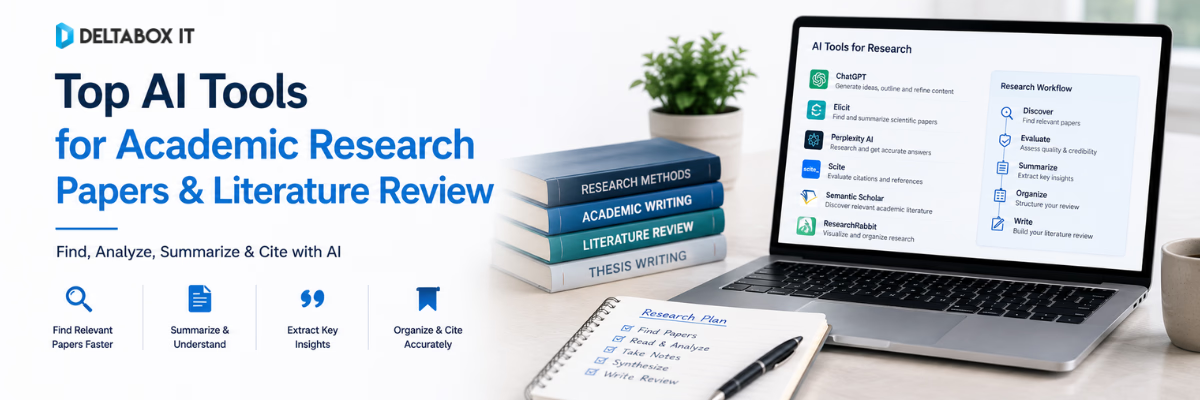
Elicit is strong for structured literature reviews and evidence extraction. Consensus and Semantic Scholar help researchers find academic papers. ResearchRabbit and Litmaps reveal connections between studies. Scite provides citation context. NotebookLM works well with a controlled source collection. ChatGPT, Claude, Gemini and Perplexity support broader research and synthesis workflows, while Paperpal focuses on academic writing, citations and final editing.
The best AI for academic research is therefore not one universal product. It is the tool—or combination of tools—that solves a specific research problem without weakening source verification or academic integrity.
This article focuses only on the research-paper and literature-review workflow. For a broader comparison of writing, learning, plagiarism-checking and study platforms, read the guide to essential education and research AI tools for Bangladeshi students and researchers.
Quick Answer: Which AI Tools Are Best for Research Papers?
For most researchers, the strongest workflow uses different tools at different stages.
| Research Task | Recommended Tool |
|---|---|
| Structured literature review | Elicit |
| Research-backed question answering | Consensus |
| Fast academic-paper discovery | Semantic Scholar |
| Citation-network exploration | ResearchRabbit or Litmaps |
| Citation-context checking | Scite |
| Analysing a selected source collection | NotebookLM |
| Flexible research planning and synthesis | ChatGPT |
| Detailed long-document analysis | Claude |
| Google-connected research workflow | Gemini |
| Fast web-grounded research | Perplexity |
| Academic writing and final editing | Paperpal |
A practical workflow may begin with Consensus or Semantic Scholar, expand through ResearchRabbit or Litmaps, use Elicit to compare studies, and then rely on NotebookLM, ChatGPT or Claude to analyse selected documents. Scite can help investigate important citations, while Paperpal can improve academic language and reference consistency.
This is more reliable than asking one chatbot to write an entire literature review from a single prompt.
How to Choose an AI Research Tool
A feature list alone does not tell you whether a research tool is useful. The correct choice depends on the stage where your workflow currently breaks down.
A student who cannot find enough relevant papers needs a discovery tool. A researcher managing dozens of studies needs structured screening and evidence extraction. Someone who has already completed the research may need academic-language editing rather than another search platform.
Use the following criteria before selecting a tool.
| Evaluation Area | What to Check |
|---|---|
| Source coverage | Does it search scholarly literature, general websites or both? |
| Traceability | Can you locate the paper or passage supporting an answer? |
| Screening support | Can it evaluate titles, abstracts, methods or inclusion criteria? |
| Evidence extraction | Can it organise comparable study information? |
| Citation analysis | Does it show how later studies discuss a source? |
| Document analysis | Can it work with uploaded PDFs or selected sources? |
| Academic writing | Can it improve structure, clarity and scholarly tone? |
| Export options | Can you export citations, tables or review data? |
| Research integrity | Does it encourage source checking and transparent decisions? |
Tools that produce fluent answers but hide their evidence are weak choices for serious academic work. In research, traceability matters more than presentation quality.
What AI Research Tools Can and Cannot Do
AI research tools can reduce repetitive work. They can suggest search terms, identify related papers, extract study details, compare findings and help organise an evidence table. They can also improve sentence clarity and make long research documents easier to navigate.
However, AI does not remove the need for scholarly judgment. A platform may overlook relevant papers, misread a statistical result or compress conflicting evidence into an oversimplified conclusion. Even when an answer includes citations, the citation may not fully support the wording used in the summary.
Researchers should therefore use AI as an assistant rather than an authority.
Research principle: A polished AI response is not evidence. The original article, dataset or academic source remains the evidence.
AI tools may support the following tasks:
- Developing search terms and research sub-questions
- Screening titles, abstracts and selected full texts
- Extracting methods, samples, outcomes and limitations
- Organising verified evidence into themes
- Improving academic grammar and readability
They cannot guarantee complete literature coverage, methodological validity, citation accuracy, originality, thesis approval or publication.
1. Elicit: Best for Structured Literature Reviews
Elicit is one of the strongest AI tools for literature review when the work requires formal screening and structured evidence extraction.
Its systematic-review workflow supports research-question refinement, keyword and semantic searching, screening criteria, full-text data extraction and evidence synthesis. Elicit also provides supporting quotations or figures for extracted information, allowing researchers to inspect where a result came from. Its 2026 workflow supports PRISMA 2020-oriented documentation and auditable screening decisions.
Elicit is particularly useful when several studies must be compared across common fields such as population, intervention, research design, outcome and author-reported limitations. Instead of manually building each row of an evidence table, researchers can create extraction columns and then verify the suggested information against the source.
It is suitable for systematic reviews, scoping reviews, evidence maps and structured literature reviews in education, social science, health and policy research.
Elicit should not be treated as an automatic systematic-review generator. Researchers still need to validate the search strategy, inspect exclusions, check extracted data, assess study quality and document human decisions.
Best fit: Structured screening, evidence extraction and review documentation.
2. Consensus: Best for Research-Backed Answers
Consensus helps researchers search, understand and synthesise peer-reviewed literature using keywords, natural-language questions or more detailed research instructions.
Its current features include advanced filters for publication year, study design, population, sample size, journal rank, country and other methodological characteristics. Consensus also provides study snapshots, full-text interaction, saved collections and a Consensus Meter for suitable yes-or-no research questions.
Consensus is valuable during the early stages of a project. A student can ask a focused question and quickly identify papers, study types and possible areas of agreement or disagreement.
For example, this query is more useful than a broad keyword:
Among undergraduate students, how does fully online learning affect academic performance compared with blended learning?
The population, comparison and outcome make the search easier to interpret.
The Consensus Meter can provide a quick overview of whether selected research leans towards agreement, disagreement or mixed findings. However, it analyses a limited set of highly relevant papers rather than every study available. Methodological differences may also explain apparent disagreement.
Best fit: Research orientation, focused academic search and study-level comparison.
3. Semantic Scholar: Best for Fast Academic Discovery
Semantic Scholar is a free AI-powered research platform designed for searching and discovering scientific literature.
It indexes more than 200 million papers and provides filters for date, publication type, author, journal and conference. Supported papers may include short AI-generated TLDR summaries, influential-citation indicators, citation exports, saved libraries, research feeds and alerts.
The main advantage is speed. When a search returns dozens of results, TLDR summaries can help researchers decide which papers deserve closer examination. Research Feeds can also recommend new studies based on papers saved in a library.
These summaries should be used for initial screening, not as substitutes for abstracts or full-text reading. A short summary cannot communicate the full methodology, sample limitations, uncertainty or context of a study.
Best fit: Building an initial reading list and monitoring new publications.
4. ResearchRabbit and Litmaps: Best for Citation-Network Discovery
Keyword searching has an important limitation: it mainly finds papers that use the terminology included in the query.
Researchers working in neighbouring disciplines may describe similar concepts differently. Older foundational papers may also use terminology that no longer appears in current search phrases.
ResearchRabbit addresses this through citation networks. Researchers begin with several relevant papers and explore references, later citations, related authors and connected studies. This can reveal influential work that would be difficult to find through keywords alone.
Litmaps uses a similar citation-based principle but places greater emphasis on visual mapping. Users can explore how studies connect, organise literature by topic, share maps and receive alerts for newly published papers related to a saved search. Litmaps currently searches a catalogue of more than 270 million papers.
ResearchRabbit vs Litmaps
| Choose ResearchRabbit When | Choose Litmaps When |
|---|---|
| You want collection-based paper exploration | You want a visual map of the literature |
| You want to explore authors and related papers | You want to communicate how a field developed |
| You already have several strong seed papers | You want monitoring and visual organisation |
| Discovery is the primary goal | Mapping and project presentation also matter |
Citation proximity does not prove research quality. A closely connected paper may be outdated, methodologically weak or irrelevant to the exact research population. Every discovered study still requires evaluation.
Best fit: Expanding a literature search beyond obvious keywords.
5. Scite: Best for Checking Citation Context
A citation count tells you how often a paper has been cited. It does not explain why it was cited.
Scite adds context through Smart Citations, classifying citation statements as supporting, contrasting or mentioning a source. It also provides reference checking and indicators for retractions, corrections and editorial concerns. Scite reports indexing more than 1.6 billion citation statements.
This is useful when an argument depends heavily on one influential paper. A researcher can inspect whether later studies confirmed the finding, challenged the method or cited the work only as background.
Scite should not replace reading the citing paper. An automated classification may simplify a nuanced citation statement, and a paper can support one finding while challenging another.
Best fit: Investigating the strength and later treatment of important research claims.
6. NotebookLM: Best for Source-Grounded Reading
NotebookLM is most useful after the researcher has already selected a controlled group of sources.
Users can add PDFs, websites, Google Drive documents, Word files, spreadsheets, presentations, copied text and other supported sources. NotebookLM answers questions using the selected source collection and provides citations linked to relevant passages. Researchers can also enable or disable individual sources for a specific question.
This creates a more controlled environment than asking a general chatbot about an open topic. A student can upload six relevant studies and ask NotebookLM to compare their populations, methods, findings and limitations.
A useful question would be:
Compare how the selected studies define student engagement. Cite the supporting passage for each definition and identify any conflicting definitions.
NotebookLM is only as reliable as the source collection. If important papers are missing or weak studies dominate the notebook, the resulting synthesis will reflect those limitations.
Best fit: Reading and comparing a defined collection of verified sources.
7. ChatGPT: Best Flexible AI Research Assistant
ChatGPT can support research planning, search-strategy development, source comparison, document analysis, evidence organisation and academic revision.
Deep research can work with the public web, uploaded files, specific websites and connected apps. It creates a research plan, performs multi-step investigation and produces a structured report with citations or source links. Users can review and refine the plan before the research begins.
ChatGPT is especially useful when the researcher needs flexibility. It can help narrow a topic, create Boolean search combinations, design an evidence-matrix template, compare attached papers or identify gaps in a draft argument.
However, ChatGPT can still produce inaccurate statements, fabricated studies or references that do not exist. OpenAI explicitly advises users to verify important facts, quotes and citations.
Students who need broader research and document-analysis access can review current ChatGPT Plus subscription options in Bangladesh.
Best fit: Research planning, flexible synthesis and structured drafting support.
8. Claude: Best for Detailed Document Analysis
Claude is well suited to long-document reading, comparative synthesis and detailed review of complex arguments.
Claude Research performs connected searches, investigates different parts of a question and returns citation-supported findings. Depending on available integrations, it can work across the web and connected information sources.
It can be useful when a researcher needs to compare several long papers, identify disagreements, review a discussion chapter or convert verified source notes into a thematic structure.
For example:
Using only the attached papers, organise the reported barriers to online learning into student-level, teacher-level and institutional themes. Cite the supporting source for every theme and identify contradictory evidence.
Claude can produce coherent long-form summaries, but coherence should not be mistaken for completeness. The original studies must still be checked for methodology, population and limitations.
Researchers interested in long-document and synthesis workflows can review the available Claude AI subscription options.
Best fit: Detailed source comparison and long-form analytical synthesis.
9. Gemini: Best for Google-Connected Research
Gemini Deep Research combines web research with Google-connected workflows.
Google Search is included by default, while users can add or prioritise sources such as uploaded files, Gmail, Drive and NotebookLM notebooks. Gemini first creates a research plan and then develops a longer report from the selected sources.
This makes Gemini practical for researchers who already store reading notes, documents and datasets in Google Workspace. A student can combine public research with thesis notes from Drive or move a selected source collection between Gemini and NotebookLM.
The main risk is source mixing. A report may combine journal articles, institutional reports, news pages and commercial websites. These source types do not carry equal academic weight.
Students using Google-connected research workflows can review current Google AI and Gemini subscription details.
Best fit: Research projects already organised through Google Search, Drive and NotebookLM.
10. Perplexity: Best for Fast Web-Grounded Research
Perplexity is useful when a researcher needs a rapid overview of a current, interdisciplinary or web-heavy topic.
Its Research mode conducts multiple searches, reads across many sources and produces a structured report. Current versions can also analyse uploaded documents, perform calculations and show research progress while the report is being prepared.
Perplexity is particularly effective for current background research, policy developments, industry reports or topics where academic papers and recent public information both matter.
The limitation is that academic and non-academic sources may appear in the same answer. Before citing a result, researchers should determine whether the source is peer reviewed, who published it and whether it contains original research.
Researchers can review current Perplexity AI Pro subscription options.
Best fit: Fast, current research with visible source links.
11. Paperpal: Best for Academic Writing and Final Editing
Paperpal focuses on academic and research writing rather than general content generation.
Its current platform includes academic grammar correction, paraphrasing, research search, citation support, PDF analysis, plagiarism checking, reference checking and submission-readiness features. Paperpal states that its research feature works across more than 250 million academic articles and that its citation tools support thousands of reference styles.
Paperpal is most useful after the researcher has completed the main evidence work. It can improve clarity, reduce wordiness, identify inconsistencies and support citation organisation without changing the intended academic context.
It cannot validate a methodology, prove that a source supports a claim or guarantee thesis or journal acceptance.
Students and researchers can review current Paperpal Prime subscription options in Bangladesh.
Best fit: Academic-language editing, references and final manuscript preparation.
AI Research Workflow: From Question to Final Paper
The most reliable way to use AI is to assign each tool a clear role.
| Research Stage | Main Objective | Suitable Tools |
|---|---|---|
| 1. Define the question | Narrow the topic and identify variables | ChatGPT, Claude, Gemini |
| 2. Find literature | Discover relevant academic papers | Consensus, Semantic Scholar, Elicit |
| 3. Expand the search | Find connected and overlooked studies | ResearchRabbit, Litmaps |
| 4. Screen and extract | Compare methods, samples and findings | Elicit, Consensus |
| 5. Organise evidence | Build themes and evidence matrices | NotebookLM, Elicit, Claude |
| 6. Check claims | Verify sources and citation context | Scite, original publisher pages |
| 7. Draft and edit | Improve structure and academic language | ChatGPT, Claude, Paperpal |
Stage 1: Define a Focused Research Question
A broad topic such as “AI in education” is not yet a research question. It does not identify the population, context, outcome or relationship being investigated.
ChatGPT, Claude or Gemini can help break a broad subject into smaller researchable components. The student should then refine the final question with a supervisor or subject expert.
Prompt example
My broad topic is generative AI in university education. Suggest five researchable questions. For each, identify the population, main variable, outcome and likely study design. Do not generate references.
The researcher should choose a question that can be answered with available evidence rather than selecting the most impressive wording.
Stage 2: Build the Search Strategy
A literature search should include concepts, synonyms, spelling variations and discipline-specific terminology.
For example:
(“generative AI” OR “large language model” OR ChatGPT) AND (“academic writing” OR “student writing”) AND (university OR undergraduate OR postgraduate)
AI can help produce initial Boolean strings, but researchers should test multiple versions in relevant databases. A single generated query may miss terminology used in another discipline.
Stage 3: Find and Expand the Literature
Consensus, Semantic Scholar and Elicit can provide an initial set of relevant papers. Once several strong studies are identified, ResearchRabbit or Litmaps can expand the search through references and later citations.
A comprehensive search usually combines:
- Keyword and semantic searching
- Backward reference checking
- Forward citation searching
- Author-based searching
- Alerts for newly published papers
The goal is not to collect the largest number of papers. It is to find a defensible body of relevant evidence.
Stage 4: Screen Papers Consistently
Before reading every paper in full, define the inclusion and exclusion criteria.
Criteria may include the target population, study setting, research design, publication period, language, outcome and publication type. Elicit and Consensus can assist with initial screening, but uncertain cases should receive human review.
A screening record should explain why a study was included or excluded. This is particularly important for systematic and scoping reviews.
Stage 5: Summarise and Organise Evidence
General summaries are rarely enough for academic synthesis. Researchers need comparable fields.
An evidence matrix may include:
| Source | Method | Sample | Main Finding | Limitations | Theme |
|---|---|---|---|---|---|
| Study A | Survey | 420 students | |||
| Study B | Interviews | 28 teachers | |||
| Study C | Experiment | 160 students |
Elicit can assist with structured extraction, while NotebookLM, ChatGPT or Claude can help reorganise verified notes. The AI output should be checked against the original paper before entering it into the evidence matrix.
Stage 6: Develop the Literature Review
A strong literature review does not summarise one article after another. It organises evidence by themes, methods, populations, theories or areas of disagreement.
Weak structure:
Author A found this. Author B found that. Author C discussed another issue.
Stronger structure:
Experimental studies generally report one pattern, while survey-based findings remain mixed. The difference may reflect sample selection, duration and how the outcome was measured.
AI can help identify possible thematic structures, but the researcher must decide which interpretation is supported by the evidence.
Stage 7: Verify, Draft and Edit
Drafting should begin from the verified evidence matrix rather than from an open-ended AI prompt.
Write the main claim, add the supporting evidence, explain relationships between studies and acknowledge contradictory findings. AI may then help improve organisation, transitions or readability.
Before submission, check the citations and final language. Scite can help investigate how important claims have been treated in later literature. Paperpal can support academic-language editing, while Grammarly and QuillBot may assist with general grammar or selective rewriting.
Students can compare:
- Paperpal Prime for academic writing and research editing
- Grammarly Premium for grammar and writing clarity
- QuillBot Premium for paraphrasing and rewriting
A paraphrased idea still requires citation.
Recommended AI Tool Stacks
For Undergraduate Research Papers
A simple workflow is usually enough.
| Stage | Tool |
|---|---|
| Paper discovery | Semantic Scholar or Consensus |
| Selected-source reading | NotebookLM |
| Planning and structure | ChatGPT |
| Language editing | Grammarly or Paperpal |
| References | Citation manager or verified citation tool |
Using too many overlapping platforms can create more work rather than less.
For Master’s Theses
A thesis usually needs stronger literature organisation.
| Stage | Tool |
|---|---|
| Discovery | Consensus or Elicit |
| Citation expansion | ResearchRabbit or Litmaps |
| Study comparison | Elicit |
| PDF and source analysis | NotebookLM or Claude |
| Citation context | Scite |
| Academic editing | Paperpal |
| Similarity review | Turnitin |
Students requiring an external similarity check can review the available Turnitin plagiarism-checking service in Bangladesh and confirm report type, repository setting and document requirements before submission.
For Systematic Reviews
AI can support a systematic review, but the process must remain transparent and reproducible.
Researchers should maintain:
- A documented protocol
- Appropriate database coverage
- Explicit inclusion and exclusion criteria
- Human review of uncertain papers
- Verified data extraction
- Risk-of-bias or quality assessment
- A clear record of every decision
Elicit can support several of these stages, but it does not remove the responsibility to follow discipline-specific review standards.
Common AI Research Mistakes
Relying on One Tool
A single platform rarely performs discovery, screening, citation analysis, writing and editing equally well. Using one chatbot for the complete research paper creates blind spots.
Assign each platform a limited role. A discovery tool should help find literature. A synthesis tool should work with selected sources. An editor should improve language after the evidence is already established.
Trusting Generated Citations
A reference can look realistic and still be incorrect or fabricated. It may also exist but fail to support the claim attached to it.
Open the original source and confirm the author, publication, method and relevant passage before citing it.
Replacing Reading With Summaries
AI summaries are useful for orientation, but they often compress methodology, uncertainty and limitations.
Researchers should read the full text of the most important papers, especially those supporting central claims.
Using Paraphrasing to Hide Source Use
Changing words does not create original scholarship. Mechanical paraphrasing may retain the structure or meaning of the original text and still require attribution.
The correct process is to understand the source, explain it in a new structure and cite it accurately.
Ignoring Contradictory Evidence
A weak literature review selects only studies supporting the preferred conclusion. A credible review explains disagreement and considers whether methods, samples or contexts caused different results.
Five-Step AI Research Verification Process
Before using an AI-generated claim in a research paper:
- Confirm that the source exists.
- Open and read the relevant section.
- Check the population, method and result.
- Determine whether the AI overstated the conclusion.
- Verify the author, title, year, journal and DOI.
For central arguments, one source is rarely enough. Look for supporting and contradictory evidence.
Practical Research Prompts
Search Strategy Prompt
My research question is [insert question]. Create a concept table containing the main ideas, synonyms, spelling variations and related academic terminology. Then create three Boolean search strings. Do not invent references.
Evidence Extraction Prompt
Using only the attached paper, extract the study population, research design, sample size, outcome measures, main findings and author-reported limitations. Cite the exact supporting passage for each field.
Comparative Synthesis Prompt
Based only on the selected studies, identify areas of agreement, disagreement and methodological difference. Separate established findings from uncertain conclusions.
Citation Audit Prompt
Review this section and list each factual claim with its current citation. Flag claims that have no source, use an unsuitable source or appear stronger than the cited evidence.
Choosing AI Research Tools in Bangladesh
Bangladeshi students and researchers should choose tools according to workload, academic level and access requirements rather than global popularity.
A student writing one short assignment may not need a paid research stack. A master’s or PhD researcher managing dozens of sources may gain more value from higher document limits, evidence extraction and academic-editing features.
Before selecting a subscription, confirm:
- Whether the tool searches academic literature or the general web
- Whether source links and supporting passages are available
- Upload, document and usage limits
- Citation and export options
- Personal or shared access type
- Renewal conditions
- Data and document privacy
- University or supervisor AI-use rules
The Education and Research tools collection includes options for research assistance, academic writing, similarity checking and study support.
DeltaBox IT is an independent third-party digital-product provider. It does not own, develop or control the tools discussed in this guide. Product features, limits and availability remain subject to the respective platform providers.
Final Verdict
The best AI tools for research papers are not necessarily the platforms that generate the longest or most polished answer.
The strongest tools make research evidence easier to find, compare and verify.
Use:
- Elicit for structured screening and evidence extraction
- Consensus for research-backed question answering
- Semantic Scholar for fast paper discovery
- ResearchRabbit or Litmaps for citation-network exploration
- Scite for citation-context checking
- NotebookLM for analysing a selected source collection
- ChatGPT, Claude, Gemini or Perplexity for flexible research and synthesis
- Paperpal for academic-language editing and final preparation
A responsible workflow still requires the researcher to define the question, search more than one source, read the original papers, document decisions, compare methods, verify citations and write the final interpretation independently.
Use AI to reduce repetitive work—not to outsource scholarly judgment.
Frequently Asked Questions
What is the best AI tool for research papers?
There is no universal best tool. Elicit is strong for structured literature reviews, Consensus for research-backed answers, Semantic Scholar for discovery, Scite for citation context, NotebookLM for selected-source analysis and Paperpal for academic editing.
What is the best AI tool for literature reviews?
Elicit is one of the strongest tools for structured screening and evidence extraction. Consensus, ResearchRabbit, Litmaps, Scite and NotebookLM support different stages of the literature-review workflow.
Can ChatGPT write a research paper?
ChatGPT can help plan, organise, compare sources and improve language. It should not independently generate a complete academic paper because claims and citations may be inaccurate or fabricated.
Can AI tools find real academic papers?
Yes. Consensus, Semantic Scholar, Elicit, ResearchRabbit, Litmaps and Scite are built around scholarly literature. Researchers should still open and evaluate the original papers.
Is Consensus better than Elicit?
Consensus is generally more convenient for asking a focused research question and finding relevant studies. Elicit is stronger for structured screening, extraction and formal literature-review workflows.
Is ResearchRabbit better than Litmaps?
ResearchRabbit is useful for collection-based exploration and better than Elicit?
Consensus is generally more convenient for asking a focused research question and finding relevant studies. related-paper discovery. Litmaps is more suitable when visual mapping, monitoring and presentation are priorities.
Can NotebookLM help with a literature review?
Yes. NotebookLM can compare a selected collection and link answers to supporting source passages. It cannot ensure that the uploaded collection represents the complete literature.
Is Scite a plagiarism checker?
No. Scite is primarily a research-discovery and citation-context tool. It helps users investigate whether later studies support, contrast with or mention a cited paper.
Can AI generate accurate citations?
AI tools can suggest or format references, but every author, title, year, journal, DOI and supporting passage must be checked manually.
Which tool is best for academic writing?
Paperpal is specialised for academic editing, references and manuscript preparation. Grammarly supports broader grammar and clarity, while QuillBot focuses more heavily on paraphrasing and rewriting.
Can AI replace Google Scholar or university databases?
No. AI tools can improve discovery and synthesis, but major research projects may still require university library databases, discipline-specific indexes and documented search strategies.
Are AI paper summaries reliable?
They can support initial screening, but they may omit methodology, limitations and uncertainty. Researchers should read the original paper before citing a finding.
Can AI perform a systematic review?
AI can support searching, screening and extraction. A credible systematic review still requires a protocol, appropriate databases, transparent criteria, quality assessment and human verification.
Should researchers use one or several AI tools?
Complementary tools usually produce a stronger workflow. One may handle discovery, another evidence extraction, another citation checking and another academic editing.
Where can students access academic AI tools in Bangladesh?
Students can explore Education and Research tools available through DeltaBox IT and confirm the current plan type, duration, limits and support conditions before selecting a package.
Building a research paper or literature review? First identify whether your main challenge is finding sources, screening studies, organising evidence, checking citations or editing academic language.
Choose the tool that solves that specific problem rather than paying for several overlapping platforms. For current package availability, access conditions or tool-selection guidance, contact DeltaBox IT through WhatsApp.

MD. Nayeem-Ur Rahman
Related posts










Leave a Reply Cancel reply
You must be logged in to post a comment.



One thought on “Best AI Tools for Research Papers and Literature Reviews in 2026”